
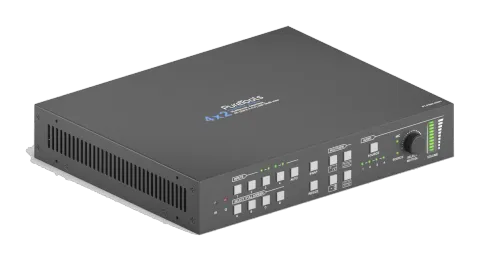
PT-PSW-42MV
4x2 4K-Multiformat-Präsentationsumschalter mit nahtloser Umschaltung und Multiview-Set
Der 4x2 4K Multiformat Seamless Presentation Switcher mit Multiview Set (42MV) ist ein Präsentationsswitcher mit 2 HDMI-, 1 HDMI/DP- und 1 HDMI/USB-C-Inputs, der Auflösungen bis zu 4K bei 30Hz unterstützt. Er verfügt …
HandbuchSteuerbefehle (TCP/IP)FAQHat NachfolgerFirmwareCEVerfügbare Steuerschnittstellen. Klappen Sie einen aktiven Typ auf, um die vollständige Befehlstabelle zu sehen.
Keine passenden Befehle.
RS232-Befehle11 BefehleAktiv
Quelle: Handbuch, Kapitel System Commands, Seite 43
| Befehl | Beschreibung | Beispiel | Antwort | |
|---|---|---|---|---|
| >GetFirewareVersion | Abrufen der Firmware-Version. | <V1.0.0 | ||
| >SetFactoryReset | Set to factory defaults. | <FactoryReset_True | ||
| >SetReboot | System Neustart. | <Reboot_EN | ||
| >SetHelp [Param] | Get the command details. [Param] = Any command. [Param] = Null (All commands) | >SetHelp | SetAV | ||
| >SetAV InParam,OutParam | InParam = 1~6 1 - HDMI 1 2 - HDMI 2 3 - HDMI 3 4 - DP 3 5 - HDMI 4 6 - TYPE-C 4 OutParam = A ~ D (NO THIS PARAMETER TO SET TO A) | |||
| >GetIpAddress | Get the IP to access GUI. | <GateWay: 192.168.0.1 | ||
| >SetKeyboardLock [Param] | Lock/unlock the front panel buttons. [Param] = EN,Dis EN - Lock Dis - Unlock (Default) | >SetKeyboardLock EN >SetKeyboardLock Dis | <KeyboardLock False | |
| >GetKeyboardLock | Get the front buttons locking status. | <KeyboardLock True | ||
| >SetPowerOn [Param] | Enter/exit standby mode [Param] = EN,Dis EN - Exit standby (Default) Dis – Enter standby | >SetPowerOn EN >SetPowerOn Dis | <PowerOn False | |
| >GetPowerOn | Get the system standby status. | <PowerOn True | ||
| >GetStatus | Ruft den Systemstatus ab. | <V1.0.0 <Video OUT A B C D IN 1 2 3 5 <AudioSource 1 <OutputResolution 8 |
Signal Switching Commands8 BefehleAktiv
Quelle: Handbuch, Kapitel Signal Switching Commands, Seite 44
| Befehl | Beschreibung | Beispiel | Antwort | |
|---|---|---|---|---|
| >SetAV [InParam],[OutParam] | Switch input source to output window. [InParam] = 1 ~ 6 1 - HDMI 1 2 - HDMI 2 3 - HDMI 3 4 - DP 3 5 - HDMI 4 6 - USB-C 4 [OutParam] = A ~ D (No this parameter when switching input source to window A) | >SetAV 3 >SetAV 1,A <AV 1,A | ||
| >GetAV [OutParam] | Get the input source of window [OutParam]. [OutParam] = A~D (No this parameter when get input sources of all windows) | >GetAV >GetAV A <Video 1,A | ||
| >SetAutoSwitch [Param] | Enable/disable auto switching mode. [Param] = EN,Dis EN - Enable (Default) Dis - Disable | >SetAutoSwitch EN >SetAutoSwitch Dis <AutoSwitch False | ||
| >GetAutoSwitch | Abrufen des Status der automatischen Umschaltung. | <AutoSwitch True | ||
| >SetInput3Type [Param] | Select the input source for the third input channel. [Param] = H,Dp H - HDMI input Dp - DP input | >SetInput3Type H <Input3Type H | ||
| >GetInput3Type | Get the input source of the third input channel. | <Input3Type H | ||
| >SetInput4Type | Select the input source for the fourth input channel. [Param] = H, C H - HDMI input C – USB-C input | >SetInput4Type H <Input4Type H | ||
| >GetInput4Type | Get the input source for the fourth input channel. | <Input4Type H |
RS232-Befehle16 BefehleAktiv
Quelle: Handbuch, Kapitel Audio Setting Commands, Seite 45
| Befehl | Beschreibung | Beispiel | Antwort | |
|---|---|---|---|---|
| >SetMicAudioMute [Param] | Mute/Unmute microphone audio. [Param] = EN, Dis EN - Mute. Dis - Unmute (Default) | >SetMicAudioMute EN >SetMicAudioMute Dis <MicAudioMute False | ||
| >GetMicAudioMute | Get the microphone audio mute status | <MicAudioMute False | ||
| >SetMicVOL [Param] | Set the microphone audio volume to [Param]. [Param] = 0~60 (Default: 60) | >SetMicVOL 6 <MicVOL 6 | ||
| >GetMicVOL | Get the microphone audio volume. | <MicVOL 6 | ||
| >SetSourceAudioMute [Param] | Mute/Unmute source audio. [Param] = EN, Dis EN - Mute. Dis - Unmute (Default) | >SetSourceAudioMute EN >SetSourceAudioMute Dis <SourceAudioMute False | ||
| >GetSourceAudioMute | Get the source audio mute status | <SourceAudioMute True | ||
| >SetSourceVOL [Param] | Set the source audio volume to [Param]. [Param] = 0~60 (Default: 60) | >SetSourceVOL 6 <SourceVOL 6 | ||
| >GetSourceVOL | Get the source audio volume. | <SourceVOL 60 | ||
| >SetAudioSource [Param] | Set the source audio of ouput to [Param]. [Param] = 1~5. 1 6 HDMI 1 (Default) 2 6 HDMI 2 3 6 HDMI/DP 3 4 6 HDMI/USB-C 4 5 6 LINE IN | >SetAudioSource 2 <AudioSource 2 | ||
| >GetAudioSource | Get the source audio of ouput. | <AudioSource 1 | ||
| >SetAudioMix [Param] | Enable/Disable audio mixing. [Param] = EN, Dis EN - Enable (Default) Dis - Disable | >SetAudioMix EN <AudioMix True | ||
| >GetAudioMix | Get audio mixing status. | <AudioMix True | ||
| >SetFullModeAudioSwitch [Param] | Set whether the audio follows video switching in full screen mode. [Param] = EN, Dis EN - Enable (Default) Dis - Disable | >SetFullModeAudioSwitch EN <FullModeAudioSwitch True | ||
| >GetFullModeAudioSwitch | Get whether the audio follows video switching in full screen mode. | <FullModeAudioSwitch True | ||
| >SetAudioDelay [Param] | Set the delay time of audio output to [Param]. [Param] = 0 ~ 170 (ms) (Default: 0). | >SetAudioDelay 20 <AudioDelay 20 | ||
| >GetAudioDelay | Get the delay time of audio output. | <AudioDelay 20 |
RS232-Befehle10 BefehleAktiv
Quelle: Handbuch, Kapitel Function Setting Commands, Seite 46
| Befehl | Beschreibung | Beispiel | Antwort | |
|---|---|---|---|---|
| >SetRS232Baudrate [Param] | Set the baud rate of RS232 port to [Param]. [Param] = 1 ~ 5 1 - 115200 2 - 57600 3 - 38400 4 - 19200 5 - 9600 (Default) | >SetRS232Baudrate 5 <RS232Baudrate 5 | <RS232Baudrate 5 | |
| >GetRS232Baudrate | Get the baud rate of RS232 port. | <RS232Baudrate 5 | ||
| >SetOutputResolution [Param] | Set the output resolution to [Param]. [Param] = 1 ~ 8 1 - 1024x768@60Hz 2 - 1280x720@60Hz 3 - 1360x768@60Hz 4 - 1600x1200@60Hz 5 - 1920x1080@60Hz 6 - 1920x1200@60Hz 7 - 3840x2160@30Hz (Default) 8 - AUTO | >SetOutputResolution 4 <OutputResolution 4 | <OutputResolution 4 | |
| >GetOutputResolution | Get the output resolution. | <OutputResolution 4 | ||
| >GetInputResolution [Param] | Get the input resolution. [Param] = 1~4. 1 - HDMI 1 2 - HDMI 2 3 - HDMI/DP 3 4 - HDMI/USB-C 4 | >GetInputResolution 1 <HdcpHdmiOutput 1 | <HdcpHdmiOutput 1 | |
| >SetInPortEdid [Param1],[Param2] | Set the EDID of input soure. [Param1] = 1 ~ 6 1 - HDMI 1 2 - HDMI 2 3 - HDMI 3 4 - DP 3 5 - HDMI 4 6 - USB-C 4 [Param2] = 1 ~ 5 1 - 1920x1080 60HZ PCM 2CH 2 - 3840x2160 30HZ PCM 2CH (Default) 3 - BYPASS HDMI 4 - BYPASS HDBT 5 - USER | >SetInPortEdid 1,1 <InPortEdid 1,1 | <InPortEdid 1,1 | |
| >GetInPortEdid [Param] | Get the EDID of input source. [Param] = 1 ~ 6 1 - HDMI 1 2 - HDMI 2 3 - HDMI 3 4 - DP 3 5 - HDMI 4 6 - USB-C 4 | >GetInPortEdid 1 <InPortEdid 1,1 | <InPortEdid 1,1 | |
| >SetUpdateEdid_EN | Benutzerdefinierte EDID hochladen. | / <Time out to send edid | ||
| >SetMvMode [Param] | Set multiview mode. [Param] = 1 ~ 20 1 - 1 WINDOWS Full 2 - 2 WINDOWS PBP 3 - 3 WINDOWS 2U1D 4 - 4 WINDOWS SAME SIZE (Default) 5 - 2 WINDOWS PIP LU 6 - 2 WINDOWS PIP LD 7 - 2 WINDOWS PIP RU 8 - 2 WINDOWS PIP RD 9 - 4 WINDOWS PBP 3L1R 10 - 4 WINDOWS PBP 1L3R 11 - 4 WINDOWS PBP 3U1D 12 - 4 WINDOWS PBP 1U3D 13 - 4 WINDOWS PIP 1F3L 14 - 4 WINDOWS PIP 1F3R 15 - 4 WINDOWS PIP 1F3U 16 - 4 WINDOWS PIP 1F3D 17 - USER CONFIG 1 18 - USER CONFIG 2 19 - USER CONFIG 3 20 - USER CONFIG 4 | >SetMvMode 1 <MvMode 1 | <MvMode 1 | |
| >GetMvMode | Get multiview mode | <MvMode 1 |
CEC Commands22 BefehleAktiv
Quelle: Handbuch, Kapitel CEC Commands, Seite 50
| Befehl | Beschreibung | Beispiel | Antwort | |
|---|---|---|---|---|
| >SetCecSrcMenu [Param] | Send CEC MENU command to source device. [Param] = 1 ~ 4 | >SetCecSrcMenu 1 <CecSrcMenu 1 | <CecSrcMenu 1 | |
| >SetCecSrcUp [Param] | Send CEC UP command to source device. [Param] = 1 ~ 4 (HDMI 1~4) | >SetCecSrcUp 1 <CecSrcUp 1 | <CecSrcUp 1 | |
| >SetCecSrcDown [Param] | Send CEC DOWN command to source device. [Param] = 1 ~ 4 (HDMI 1~4) | >SetCecSrcDown 1 <CecSrcDown 1 | <CecSrcDown 1 | |
| >SetCecSrcLeft [Param] | Send CEC LEFT command to source device. [Param] = 1 ~ 4 (HDMI 1~4) | >SetCecSrcLeft 1 <CecSrcLeft 1 | <CecSrcLeft 1 | |
| >SetCecSrcRight [Param] | Send CEC RIGHT command to source device. [Param] = 1 ~ 4 (HDMI 1~4) | >SetCecSrcRight 1 <CecSrcRight 1 | <CecSrcRight 1 | |
| >SetCecSrcBack [Param] | Send CEC BACK command to source device. [Param] = 1 ~ 4 (HDMI 1~4) | >SetCecSrcBack 1 <CecSrcBack1 | <CecSrcBack1 | |
| >SetCecSrcEnter [Param] | Send CEC ENTER command to source device. [Param] = 1 ~ 4 (HDMI 1~4) | >SetCecSrcEnter 1 <CecSrcEnter 1 | <CecSrcEnter 1 | |
| >SetCecSrcOn [Param] | Send CEC ON command to source device. [Param] = 1 ~ 4 (HDMI 1~4) | >SetCecSrcOn 1 <CecSrcOn 1 | <CecSrcOn 1 | |
| >SetCecSrcOff [Param] | Send CEC OFF command to source device. [Param] = 1 ~ 4 (HDMI 1~4) | >SetCecSrcOff 1 <CecSrcOff 1 | <CecSrcOff 1 | |
| >SetCecSrcStop [Param] | Send CEC STOP command to source device. [Param] = 1 ~ 4 (HDMI 1~4) | >SetCecSrcStop 1 <CecSrcStop 1 | <CecSrcStop 1 | |
| >SetCecSrcPlay [Param] | Send CEC PLAY command to source device. [Param] = 1 ~ 4 (HDMI 1~4) | >SetCecSrcPlay 1 <CecSrcPlay 1 | <CecSrcPlay 1 | |
| >SetCecSrcPause [Param] | Send CEC PAUSE command to source device. [Param] = 1 ~ 4 (HDMI 1~4) | >SetCecSrcPause 1 <CecSrcPause 1 | <CecSrcPause 1 | |
| >SetCecSrcPrev [Param] | Send CEC PREV command to source device. [Param] = 1 ~ 4 (HDMI 1~4) | >SetCecSrcPrev 1 <CecSrcPrev 1 | <CecSrcPrev 1 | |
| >SetCecSrcNext [Param] | Send CEC NEXT command to source device. [Param] = 1 ~ 4 (HDMI 1~4) | >SetCecSrcNext 1 <CecSrcNext 1 | <CecSrcNext 1 | |
| >SetCecSrcRewind [Param] | Send CEC REWIND command to source device. [Param] = 1 ~ 4 (HDMI 1~4) | >SetCecSrcRewind 1 <CecSrcRewind 1 | <CecSrcRewind 1 | |
| >SetCecSrcFastForward [Param] | Send CEC Fast-forward command to source device. [Param] = 1 ~ 4 (HDMI 1~4) | >SetCecSrcFastForward 1 <CecSrcFastForward 1 | <CecSrcFastForward 1 | |
| >SetCecDisplayOn [Param] | Send CEC ON command to display device. [Param] = 1 ~ 2 (1 - HDMI, 2 - HDBT) | >SetCecDisplayOn 1 <CecDisplayOn 1 | <CecDisplayOn 1 | |
| >SetCecDisplayOff [Param] | Send CEC OFF command to display device. [Param] = 1 ~ 2 (1 - HDMI, 2 - HDBT) | >SetCecDisplayOff 1 <CecDisplayOff 1 | <CecDisplayOff 1 | |
| >SetCecDisplaySource [Param] | Send CEC SOURCE command to display device. [Param] = 1 ~ 2 (1 - HDMI, 2 - HDBT) | >SetCecDisplaySource 1 <CecDisplaySource 1 | <CecDisplaySource 1 | |
| >SetCecDisplayMute [Param] | Send CEC MUTE command to display device. [Param] = 1 ~ 2 (1 - HDMI, 2 - HDBT) | >SetCecDisplayMute 1 <CecDisplayMute 1 | <CecDisplayMute 1 | |
| >SetCecDisplayVol+ [Param] | Send CEC VOLUME UP command to display device. [Param] = 1 ~ 2 (1 - HDMI, 2 - HDBT) | >SetCecDisplayVol+ 1 <CecDisplayVol+ 1 | <CecDisplayVol+ 1 | |
| >SetCecDisplayVol- [Param] | Send CEC VOLUME DOWN command to display device. [Param] = 1 ~ 2 (1 - HDMI, 2 - HDBT) | >SetCecDisplayVol- 1 <CecDisplayVol- 1 | <CecDisplayVol- 1 |
RS232 Befehle11 BefehleAktiv
Quelle: Handbuch, Kapitel RS232 Control – Command Description, Seite 49
| Befehl | Beschreibung | Beispiel | Antwort | |
|---|---|---|---|---|
| >SetSwapSrouce | Swap input source of window. | <Video OUT A B C D IN 2 5 1 3 <AudioSource 1 | ||
| >SetResizeWin | Resize display windows. | <ResizeWin | ||
| >SetAutoCec [Param] | Set whether to automatically send CEC commands after signal detection. [Param] = EN, Dis EN - Enable (Default) Dis - Disable | >SetAutoCec EN <AutoCec True | <AutoCec True | |
| >GetAutoCec | Get whether to automatically send CEC commands after signal detection. | <AutoCec True | ||
| >SetAutoCommand [Param] | Set whether to automatically send RS232 commands after signal detection. [Param] = EN, Dis EN - Enable (Default) Dis - Disable | >SetAutoCommand EN <AutoCommand True | <AutoCommand True | |
| >GetAutoCommand | Get whether to automatically send RS232 commands after signal detection. | <AutoCommand True | ||
| >SetAutoStandby [Param] | Enable/disable auto standby after no signal detection. [Param] = EN, Dis EN - Enable Dis - Disable (Default) | >SetAutoStandby EN <AutoStandby True | <AutoStandby True | |
| >GetAutoStandby | Get auto standby setting status. | <AutoStandby True | ||
| >SetAutoRelay [Param] | Enable/Disable auto power off function of relay. [Param] = EN, Dis EN - Enable Dis - Disable (Default) | >SetAutoRelay EN <AutoRelay True | <AutoRelay True | |
| >GetAutoRelay | Get auto power off setting status of relay. | <AutoRelay True | ||
| >SetPanelCEC [Param] | Set the delay time to send CEC, RS232 and standby commands after removing input signal removed. [Param] = 0~1800 (s) (Default: 600s) | >SetPanelCEC 9 <PanelCEC 9 | <PanelCEC 9 |
RS232 Befehle10 BefehleAktiv
Quelle: Handbuch, Kapitel RS232 Control – Command Description, Seite 50
| Befehl | Beschreibung | Beispiel | Antwort | |
|---|---|---|---|---|
| >GetPanelCEC | Get the delay time to send CEC, RS232 and standby commands after removing input signal removed. | <PanelCEC 9 | ||
| >SetOffMsgLoopCnt [Param] | Set the number of times of sending Display Off command. [Param] = 1 ~ 2 (Default: 1) | >SetOffMsgLoopCnt 1 | <OffMsgLoopCnt 1 | |
| >GetOffMsgLoopCnt | Get the number of times of sending Display Off command. | <OffMsgLoopCnt 1 | ||
| >SetOffMsgLoopDelayTime [Param] | Set the delay time of sending Display Off command. [Param] = 5 ~ 100 (1=100ms) (Default: 10) | >SetOffMsgLoopDelayTime 5 | <OffMsgLoopDelayTime 5 | |
| >GetOffMsgLoopDelayTime | Get the delay time of sending Display Off command. | <OffMsgLoopDelayTime 5 | ||
| >SetInputMsgDelayTime [Param] | Set the delay time of sending Display Input Select command. [Param] = 1 ~ 100 (s) (Default: 3) | >SetInputMsgDelayTime 10 | <InputMsgDelayTime 10 | |
| >GetInputMsgDelayTime | Get the delay time of sending Display Input Select command. | <InputMsgDelayTime 10 | ||
| >SetDisplayOn [Param] | Power on/off the display device. (Send RS232 and CEC commands at the same time). [Param] = EN, Dis EN - Power on Dis - Power off | >SetDisplayOn EN >SetDisplayOn Dis | <DisplayOn True <DisplayOn False | |
| >SetHdbtPOCOn [Param] | Enable or disable PoC. [Param] = EN, Dis EN - Enable (Default) Dis - Disable | >SetHdbtPOCOn EN | <HdbtPOCOn True | |
| >GetHdbtPOCOn | PoC-Status abrufen. | <HdbtPOCOn True |
CEC Commands1 BefehleAktiv
Quelle: Handbuch, Kapitel 7.6 CEC Commands, Seite 50
| Befehl | Beschreibung | Beispiel | Antwort | |
|---|---|---|---|---|
| >SetCecSrcMenu [Param] | Send CEC MENU command to source device. [Param] = 1 ~ 4 | >SetCecSrcMenu 1 |
RS232-Befehle6 BefehleAktiv
Quelle: Handbuch, Kapitel Special Commands, Seite 52
| Befehl | Beschreibung | Beispiel | Antwort | |
|---|---|---|---|---|
| >SetDisplayInputSendChar_[Param]:XXXX | Set the ASCII “Display Input Select” command "XXXX" to be sent to display device when power on the switcher. [Param] = 1~5 (Baud rate of RS232 port) 1 - 115200 2 - 57600 3 - 38400 4 - 19200 5 - 9600 XXXX= ASCII data to be sent (Up to 48 characters). | >SetDisplayInputSendChar_5:1234567 | <Baudrate: 9600 <Display input select to send:1234567 | |
| >SetDisplayInputSendHex_[Param]:XX XX | Set the HEX “Display Input Select” command "XX XX" to be sent to display device when power on the switcher. [Param] = 1~5 (Baud rate of RS232 port) 1 - 115200 2 - 57600 3 - 38400 4 - 19200 5 - 9600 XX XX= HEX data to be sent (X = 0~9, A~F and up to 20 XX). | >SetDisplayInputSendHex_5:30 31 32 33 | <Baudrate: 9600 <Display input select to send HEX:30 31 32 33 | |
| >SetPowerOnSendChar_[Param]:XXXX | Set the ASCII “Power On” command "XXXX" to be sent to display device when power on the switcher. [Param] = 1~5 (Baud rate of RS232 port) 1 - 115200 2 - 57600 3 - 38400 4 - 19200 5 - 9600 XXXX= ASCII data to be sent (Up to 48 characters). | >SetPowerOnSendChar_5:1234567 | <Baudrate: 9600 <Power on to send:1234567 | |
| >SetPowerOnSendHex_[Param]:XX XX | Set the HEX “Power On” command "XX XX" to be sent to display device when power on the switcher. [Param] = 1~5 (Baud rate of RS232 port) 1 - 115200 2 - 57600 3 - 38400 4 - 19200 5 - 9600 XX XX= HEX data to be sent (X = 0~9, A~F and up to 20 XX). | >SetPowerOnSendHex_5:30 31 32 33 | <Baudrate: 9600 <Power on to send HEX:30 31 32 33 | |
| >SetSleepSendChar_[Param]:XXXX | Set the ASCII “Power Off” command "XXXX" to be sent to display device when the switcher enter standby mode. [Param] = 1~5 (Baud rate of RS232 port) 1 - 115200 2 - 57600 3 - 38400 4 - 19200 5 - 9600 XXXX= ASCII data to be sent (Up to 48 characters). | >SetSleepSendChar_5:ABCDEFG | <Baudrate: 9600 <Enter sleep to send:ABCDEFG | |
| >SetSleepSendHex_[Param]:XX XX | Set the HEX “Power Off” command "XX XX" to be sent to display device when the switcher enter standby mode. [Param] = 1~5 (Baud rate of RS232 port) 1 - 115200 2 - 57600 3 - 38400 4 - 19200 5 - 9600 XX XX= HEX data to be sent (X = 0~9, A~F and up to 20 XX). | >SetSleepSendHex_5:41 42 43 44 | <Baudrate: 9600 <Enter sleep to send HEX:41 42 43 44 |