
Aktiv
PT-HDBT-1021KVM-TX
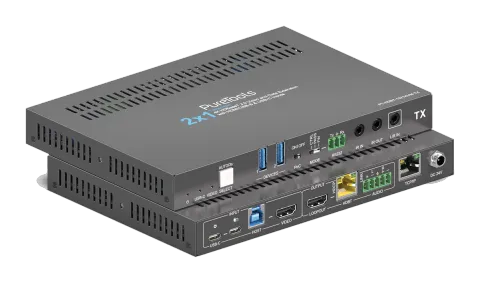
2x1 18Gbps HDBaseT 3.0 Collaboration Transmitter
Der PT-HDBT-1021KVM-TX ist ein 2x1 HDBaseT 3.0 Collaboration Transmitter mit HDMI- und USB-C-Inputs, der unkomprimierte HDMI 2.0-Signale bis zu 4K 60Hz (4:4:4) über HDBaseT-Kabelverbindungen für Entfernungen von bis zu …
HandbuchSteuerbefehle (TCP/IP)FAQSpezifikationenDatenblattCEVerfügbare Steuerschnittstellen. Klappen Sie einen aktiven Typ auf, um die vollständige Befehlstabelle zu sehen.
Keine passenden Befehle.
RS232-Befehle27 BefehleAktiv
VerbindungKommunikationsprotokoll: RS232 Kommunikationsprotokoll Baudrate: 9600 Datenbits: 8 Stopbit: 1 Paritätsbit: keine↓ CSV
Quelle: Handbuch, Kapitel RS232 Control, Seite 24
| Befehl | Beschreibung | Antwort | |
|---|---|---|---|
| STA. | Melde den Systemstatus. | PT-HDBT-1021KVM-TX 2x1 18G KVM Extender over HDBaseT 3.0 FW Version: V1.0.0a Power On! Front Panel Unlock! Local RS232 Baudrate Is 9600! MAC:50-2E-AB-0C-DE-7C! GUI IP DHCP:OFF! GUI_IP:192.168.0.178! GUI_SM:255.255.255.0! GUI_GW:192.168.0.1! HDMI Out Switch Auto Mode! HDMI Out Switch To 01! Input 01 EDID From 03 EDID! Input 02 EDID From 03 EDID! Out HDCP Follow Output! Tx Loopout Down Scale On! Trigger Mode Is 5V! Audio De-embedding On! Device Power Mode Is Follow Host! | |
| RST. | Werkseinstellung zurücksetzen. | Factory Default! | |
| Baudrate[x]. | Bps auf [x] einstellen. [x] kann 2400, 4800, 9600, 19200, 38400, 57600 oder 115200 sein. Beispiel: Baudrate9600. | Set Local RS232 Baudrate To 9600! | |
| POWON. | System einschalten. | Power On! | |
| POWOFF. | System Standby. | Power Off! | |
| HDMI[X]. | Wählen Sie X als Videoeingangsquelle. [X] kann 1-2 sein. | HDMI Out Switch To 01! | |
| HDMIA. | Auto-Switch-Modus aktivieren. | HDMI Out Switch Auto Mode! | |
| HDMIM. | Manuellen Schaltmodus aktivieren. | HDMI Out Switch Manual Mode! | |
| AOUTON. | Audio-De-Embedding einschalten. | Audio De-embedding On! | |
| AOUTOFF. | Audio-De-Embedding ausschalten. | Audio De-embedding Off! | |
| EDID/[XX]/[YY]. | Setze die Videoquelle, die am [xx]-Port am Transmitter angeschlossen ist, so, dass sie die EDID von [yy] verwendet. [XX] steht für den Videoeingangsport. 00: steht für alle Eingangsports. 01: steht für den Videoeingangsport Nr. 1. 02: steht für den Videoeingangsport Nr. 2. [YY] steht für die enthaltene EDID wie folgt: 01: Verwende die EDID des Bildschirms, der am Transmitter (TX) angeschlossen ist. 02: Verwende die EDID des Bildschirms, der am Receiver (RX) angeschlossen ist. 03:1920x1080@60 8bit Stereo (Standard) 04:1920x1080@60 8bit High Definition Audio 05:3840x2160@30Hz 8bit Stereo Audio 06:3840x2160@30Hz Deep Color High Definition Audio | Example: EDID/01/01. Feedback: Input 01 EDID Upgrade OK By 01 EDID! | |
| EDIDUpgrade[xx]. | The serial port upgrades EDID data. [xx] represents the input port, the value can be 00, 01, 02, U1, U2, U3 and U4. [xx]=00-02 means to customize the EDID of the corresponding input port (EDID is switched to the custom EDID after customization, and will not be saved in the machine), 00 means to operate on all input ports, 01-02 means input 01-02. [xx]=U1-U4 means custom built-in EDID (can be saved in the machine and recalled at any time), only one built-in EDID can be customized, and the current EDID still used after the customization is completed will not switch to the customized EDID. After receiving the instruction, the machine will prompt to send the EDID file. The file format must be .bin within 10s (in order to ensure normal data reception, all Input XX/User Define EDID Upgrade OK!) | RS232 Control HDBaseT must be disconnected before sending the instruction). | |
| LOCK. | |||
| UNLOCK. | |||
| SetDevicePowerMode[XX]. | Stellen Sie den Energiemodus ein: XX = 00-01 00: Host folgen 01: Immer an | Set Device Power Mode To Follow Host! Set Device Power Mode To Always On! | |
| SetGuiIP:xxx.xxx.xxx.xxx. | Example: SetGuiIP:192.168.0.18. | SETGUIIP:192.168.0.18! | |
| SetGuiIP_DHCPON. | |||
| SetGuiIP_DHCPOFF. | |||
| /+[X]:XXX. | Steuert die angeschlossenen Geräte. [X] steht für die Baudrate; sie kann 1-7 sein. 1—2400, 2—4800, 3—9600, 4—19200, 5—38400, 6—57600, 7—115200. XXX repräsentiert den ASCII-Code. | Example: /+3:123456. Feedback: 123456 | |
| SIGNALTRG[XX]MODE. | Wenn der Erkennungsmodus [xx] auf 1 eingestellt ist, entspricht das der 5V-Erkennung. Bei 2 handelt es sich um die TMDS-Erkennung. | Set Trigger Mode To 5V! | |
| DSON. | |||
| DSOFF. | |||
| CEC[I/O][port][command]. | [I/O]: represent either video input ports or video output port the command will be sent to. I: means the CEC command will be sent to video input port, which are the USB-C and VIDEO (HDMI port). Example: CECI010444A Feedback: CEC Input 01 Send Success! Example: CECO018004 CEC Output Port Details O: means the command will be sent to video output port, which are LOOPOUT (HDMI port) and the HDBT. [port]: specify the exact port of input/output to pass the command. When [I/O] is set to I, check the clarification if the [port] is set to below: 00: the command will be sent to both USB-C and VIDEO port. 02: the command will only be sent to the VIDEO port. When [I/O] is set to O, check the clarification if the [port] is set to below: 00: the command will be sent to LOOPOUT and HDBT. 01: the command will be sent to the display that connects to LOOPOUT port. 02: the command will be sent to the HDBT port, and finally will be send to the display that connects to the receiver remotely. [commands]: represents the exact CEC commands that need to be sent to. Please note, the CEC command must in hexadecimal format with a maximum length of 12 bytes. | Feedback: CEC Output 01 Send Success! | |
| HDCPPAS. | HDCP Details If the input has HDCP 2.2, the output will also have HDCP 2.2. If the input has HDCP 1.4, the output will have HDCP 1.4. If the input does not have HDCP, the output will not either. | ||
| HDCPMAT. | HDCPACT. Render the HDCP of the output follows the input. If the input has HDCP, no matter which version it is, the output will have HDCP 1.4. If the input does not have HDCP, the output will not either. | HDCP Active! | |
| HDCPOFF. | HDCP des Ausgangs ausschalten. Wenn es ausgeschaltet ist, wird auf dem Videoausgang kein HDCP vorhanden sein, unabhängig davon, ob der Videoeingang HDCP hat oder nicht. | Out HDCP DBG OFF! | |
| SETMAC:AA-BB-CC-DD-EE-FF | Example: SETMAC:01-02-03-04-05-06 | MAC:01-02-03-04-05-06! |